Tools of the Trade: Software for Prototyping
What is the best tool for creating prototypes?
This is a surprisingly controversial topic. Just like asking someone whether they prefer Coke or Pepsi, you’re bound to get a reason behind why their choice is best, or why water is better for you if they don’t drink soda.
Picking the right prototyping tool is really a matter of what works best for you and your experience with different applications. It’s about what you find easy to use, and allows you to create the designs you envision relatively quickly and pain free.
My favorite tools are Balsamiq, Axure, Visio and InDesign. Each has its purpose in my toolbox, and I choose which one to use based on the needs of each individual project.
Balsamiq (http://www.balsamiq.com/)
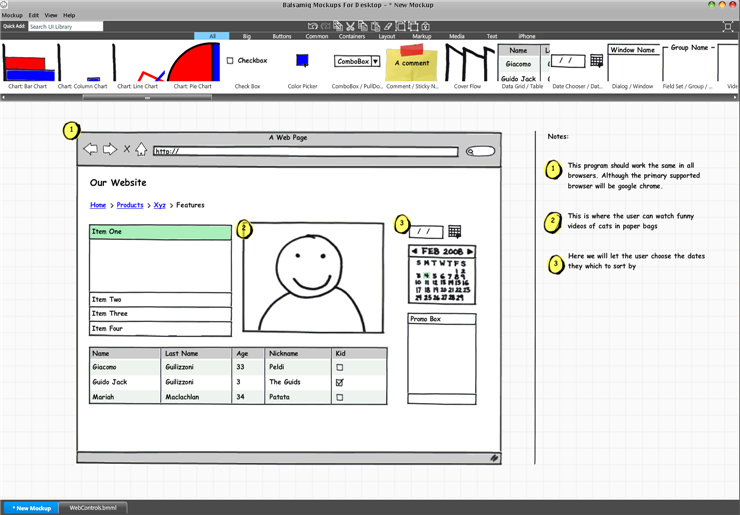
Sample Balsamiq Mockup
Balsamiq is a great tool that I use for quick, easy low-fi prototypes. Because of their pre-designed stencils I can quickly create a prototype during a design meeting, or easily refine an existing one. It is fantastically cheap at only $79. Its flashy interface and search tools are easy and fun to use. The prototypes appear sketchy which is great for me when designing for low-fi prototypes. The only con I have heard is that it is limited in its functionality. However, this doesn’t bother me as it has the level of prototyping I need, and I don’t yet need or want the complexity of fancy interactions.
Visio (http://office.microsoft.com/en-us/visio/default.aspx)
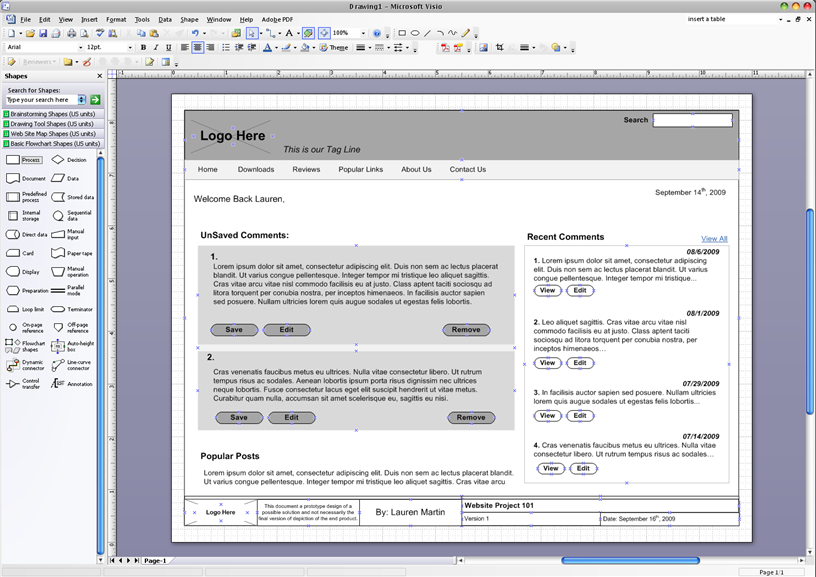
Sample Visio Wireframe
Once I move past the initial ideation of low-fi prototypes I like to refine my ideas into a more detailed design. Depending on the project, I use either Visio or InDesign for this step.
Visio allows me to create my own stencils and save them in a stencil set. I can easily drag and drop them onto the page and manipulate their size and properties. I am able to achieve a level of detail greater than I could in Balsamiq, however they are still a low enough fidelity that they will not be mistaken as a finished product. Visio is a bit more expensive at a retail price of $559. However, I find it useful not only for prototyping but also for mapping out architecture diagrams like sitemaps, and user flows. The only con would be the low level of fidelity in their existing stencils. Most of the stencils I use I have created myself.
InDesign (http://www.adobe.com/products/indesign/)
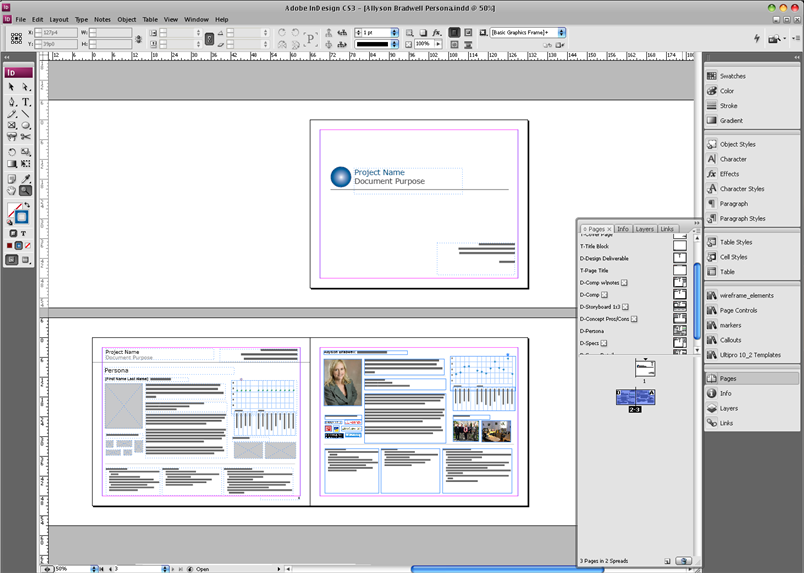
Sample InDesign Persona Document
InDesign is an Adobe product and has received a lot of marketing as a prototype tool by Nathan Curtis from EightShapes with their Unify package (http://unify.eightshapes.com/users-guide/what-you-get/) It’s a bit expensive at $699, but is overloaded with features. I like the additional level of design that I get out of InDesign as an Adobe tool. It allows me to reach a very high fidelity while still maintaining a structured prototype. My favorite feature is one of the main goals of the product, publishing. I can import all of my prototypes in to one document, annotate them, and publish a full specification. Then any changes I make to the individual prototypes are automatically updated in my document which makes for easy editing. The downfall would be the high learning curve, even for those who are familiar with some of the other Adobe products.
Axure (http://www.axure.com/)
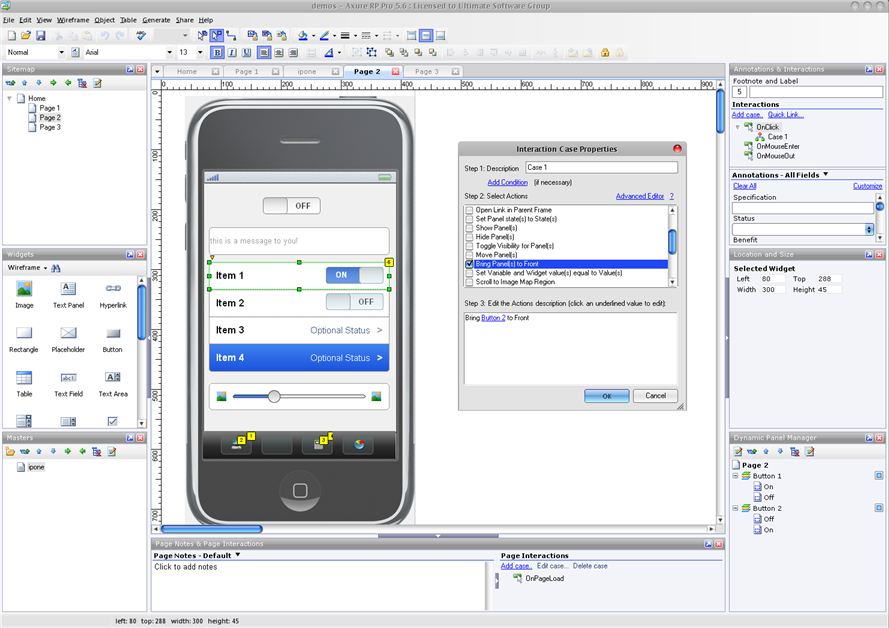
Sample Axure Prorotype
When I am ready to get into interactive prototypes Axure is the first and only tool I turn to. It’s reasonably priced at $589 considering its interactive abilities. It uses a WYSISYG interface to let users drag and drop widgets onto the screen. The widgets can then be manipulated and have actions assigned to them. Projects contain sitemaps, and have as many pages as the user chooses in them. Projects can be shared across multiple computers as well. Master widgets can be shared across pages like templates, and variables can be assigned to create the feeling of a database back end. I feel it has just about everything I need to create a mockup that acts as a real website would. This is very valuable in testing as it allows participants to actually click through and interact with the prototype similar to how they would with a final product. Axure also has built in features for generating specification and additional developer notes.
While I personally don’t use PowerPoint for my prototypes I know many designers who use it successfully and swear by it.
There are many prototyping tools popping up everywhere. Especially now that UX is becoming a more common part of the tech community. Some other common tools are:
- iPlotz (http://iplotz.com/)
- The Pencil Project (http://www.evolus.vn/Pencil/)
- iRise (http://www.irise.com/campaigns/irise/?gclid=CMfl05Pa9pwCFRpdswodvHXZbA),
- Fireworks (http://www.adobe.com/products/fireworks/)
- OmniGraffle (Mac only) (http://www.omnigroup.com/applications/OmniGraffle/)
Resources:
- 12 Great Wireframe / Prototyping Tools And Resources – http://www.subzane.com/2009/08/12-great-wireframe-prototyping-tools-and-resources/
- Quick and Easy Flash Prototypes – http://www.boxesandarrows.com/view/quick-and-easy-flash
- Interactive Prototypes with PowerPoint – http://www.boxesandarrows.com/view/interactive
- Storyboarding Rich Internet Applications with Visio – http://www.boxesandarrows.com/view/storyboarding_rich_internet_applications_with_visio
- Wireframe Annotations in Visio – http://www.boxesandarrows.com/view/wireframe_annotations_in_visio_special_deliverable_11
- Prototyping with XHTML – http://www.boxesandarrows.com/view/prototyping-with
- Visio Replacement? You Be the Judge – http://www.boxesandarrows.com/view/visio_replaceme#comment_4027
- PDF Prototypes: Mistakenly Disregarded and Underutilized – http://www.boxesandarrows.com/view/pdf-prototypes#comment_15095
Hi Lauren,
Nice post on your experiences with wireframing and prototyping tools. I have not yet heard the comparison to the Pepsi/Coke debate, but I think it is quite relevant. However, I would not consider prototyping tools a “controversial” topic, but more of a “passionate” topic. People like the tools they use and swear by them – all based on preferences and personal needs.
I would like to add another product to the Additional Tools section: ProtoShare is a web-based, collaborative prototyping tool that helps teams visualize requirements with clickable prototypes and design work. You can test multiple wireframe layouts, pull in live site views, and upload creative comps to facilitate and encourage discussions among project stakeholders. Some companies have even used it for user testing.
(I also like your post on designing for the global market. Even if an international audience is not your intention, it’s likely that foreigners will stumble upon your site. Good info to be prepared!)
Cheers,
Andrea
@ProtoShare
Lauren,
Nice list of tools. I’d also mention ForeUI (www.foreui.com), I’m starting to prefer it over Balsamiq – especially given its power and being in the same price range.
Ari
Great post! I love all these, and Balsamiq in particular (in conjunction with Napkee).
Other than just software, I love to use MockupMagnets (http://www.mockupmagnets.com) in client meetings or team meetings. It makes UI design very interactive/collaborative and fun… all you need is a whiteboard!
Again, great post!
-Efraim
Dear All,
please visit our website, in order to test the pidoco° Wireframe Tool !
It is fully web-based, has some collaboration features which our dear competitors do not offer.
You can sign-up for a full month absolutely free and you won’t even have to give any form of payment details-no obligations!
In case that you have any question, just contact us. We’d love to hear from you.
Best,
Tino
pidoco°
FWIW, I maintain a list of all the prototyping tools I know about. See http://weblogs.asp.net/fmarguerie/archive/2009/02/15/gui-design-and-prototyping-tools.aspx
Great article Lauren, I am always looking for new tools!
Tino,
I was taking a look at pidoco. There are a number of really great features. Specifically, the feature that allows you to open your design as a “sketch” or as a “plain” wireframe. It’s almost like taking Balsamiq and Axure and mashing them into one-which is always good. I am also a fan of it all being online, and having your history automatically saved and organized for you. The one aspect I was dissapointed in is the limited stencil library. You can create anything with the stencils you have, but it would be “speedier” if some common page elements were already there (like a browser window or a scroll bar). Other than that, it is very competitive and brings together some of my favorite aspects of programs like axure, balsamiq and Visio.
Great list, Lauren! It seems that since 2009 there has been a lot more players that have come to the playing field 🙂 I’m a big fan of Keynotopia used with Apple Keynote (I think it can also be used with PowerPoint) – it’s helped me creative interactive wireframes + pixel-perfect, royalty free prototypes w/o writing code (like Axure) and can be annotated for collaboration with the users. Have you tried that one? I’ve used it only for iPhone apps thus far, but others have used it for other types of apps.
Thanks for adding the resources at the end! Nice touch 🙂
Hi Cynthia, I have used Keynotopia a couple times for light work, its nice to have the easy patterns, but I have to admit last time I went to use them I ended up using Axure instead and I keep forgetting I have the Keynotopia sets. Glad to hear they are working out for you, I will have to dig them back out and try playing with them again. Cheers 🙂
Also consider WireframeSketcher, a desktop wireframing tool: http://wireframesketcher.com
It helps create wireframes using clean or sketchy styles; comes with lots of builtin controls and icons but can also be extended with custom controls; comes with stencils for mobile apps; screens can be linked to create interactive prototypes; results can be exported to PNG or clickable PDF and HTML. All graphics are vector based so that your results are always crisp and good looking.
Some users will find interesting the fact that WireframeSketcher can be plugged in into an Eclipse IDE. This also gets you version control support.
Another often overlooked feature is project management. WireframeSketcher lets you work on anything from a quick couple of screens to huge projects with hundreds of screens.